Ads, website, customers, data. One AI system. Yours.
The AI system that markets for you while others are still collecting quotes.
The Blueprint Machine builds landing pages, measures your advertising and turns enquiries into orders. You say what you want, by chat. Senior professionals safeguard every release.

“6 years of successful collaboration. Digitalisation and automation at the highest level.”
Your marketing is drowning. And the website still is not done.
“We do not know which ad channel actually works for us.”
“The new landing page with the form still does not work.”
“We cannot invest six figures without knowing whether it works.”
Meanwhile, someone in your industry is pulling ahead, measuring cleanly and building faster. The gap does not grow linearly. It compounds, month after month.
You have never heard of us. Our clients have.
EARNST does not advertise itself. We grow through referrals only. The brand is new. The experience behind it is not: SEO and web development since 2007, more than 100 websites built, over 10 million euros of ad budget managed.
- ✓100 percent of our clients came through a client. To this day.
- ✓In our consulting and services work, a client relationship lasts 4 years on average. The oldest since 2019.
- ✓We decline roughly every second enquiry when we do not believe in the success. Even though it costs revenue.

That is why there are no glossy promises here. Just measurable goals, agreed in writing, and a plan that holds for years. If we do not believe we can help you, we say so in the first conversation.
Become the business others measure themselves against.
- ✕Ten paid tools side by side, none talking to each other
- ✕A slow WordPress website that does not sell
- ✕Every change takes weeks and costs extra
- ✕No progress, no numbers, no overview
Complete digital infrastructure (ERP, 3D configurator, website, document signing), built in 3 months. Done conventionally: roughly €100,000 and a multiple of the time.
Three steps. No IT project.
You say it. In one sentence.
Via Telegram, WhatsApp, Slack or web. Wherever you already work. Around the clock.
The AI builds. Immediately.
In a protected test environment (staging), within minutes to hours depending on scope. A landing page, an extra app or a module of your own.
ChatGPT ads are here. We were ready on day one.
On September 1, OpenAI rolled out advertising inside ChatGPT across Europe — a new channel where your customers are now searching. That same day, we built full support into the Blueprint Machine: every enquiry from a ChatGPT ad carries its origin (click ID) all the way to the deal card in the built-in CRM, and conversions are reported back to ChatGPT server-side so your ads learn from real results — first-party, GDPR-compliant, exactly like Google Ads.
That same evening, the first lead arrived through a ChatGPT ad. On this website, running on this system.
When the next channel launches, you will be there on day one with us.
Free intro call →Results that get talked about.
This is what is behind the referrals: numbers from real projects.
“Ernst is the marketing professional you want by your side when the fires of disruption are raging.”
BRADFORD GOODWIN · MALCONTENT MARKETING
“A phenomenon in marketing, performance and digital sales. You feel the passion in every conversation.”
NINA KRAFT · TV HOST
“Ernst is a marketing machine. An agency on two legs.”
MAG. CHIMA RAMEEZ OKPALAUGO · FOUNDER, OKAYGROWTH
“Ernst always finds the solution and quickly stuns you with his know-how.”
THERESA STRASSER · HEAD OF DIGITAL, BANK99
“You give him problems. He gives you a whole menu of solutions!”
STEFAN MARKOV · CO-FOUNDER, ZEROBS AGENCY
When a page takes 3 seconds instead of 1 to load, the share of visitors who leave immediately rises by roughly a third (Google’s own data). And speed does not just decide whether people stay: the ad platforms’ quality score rewards fast pages with cheaper clicks, and Google ranks them higher.
A fast page is not vanity. It is cheaper clicks, better rankings and more enquiries from the same budget.
What is inside the system.
Own analytics, first-party
No Google Analytics degree required. Its own interface, a live view of visitors, answers on request in chat: which pages perform, which need rework.
Ad measurement & attribution
Closed deals flow back server-side to Google, Meta and GA4 (Enhanced Conversions, CAPI), through Google’s new Data Manager API, with no pixel on the website. Only with the visitor's consent.
CRM + sales automation
Enquiries land in the built-in CRM, with their ad-channel origin. The AI analyses the correspondence and drafts follow-up emails; nothing is sent without human approval, and every edit makes the drafts better.
A media library instead of drive chaos
Automatic alt texts in German and English, built-in image cropping for social and thumbnails. Media on your own EU server.
Two dedicated servers per client
Hetzner in Germany, managed by us. One for the test environment (staging), one for live operation. Nothing is shared (single-tenant). And every switch that sends anything outward is off by default.
Coaching included. Always.
Monthly calls with senior-level marketing professionals. The product does not exist without it.
Separate worlds: staging and live.
AI and humans work in a protected test environment (staging). Only code a senior has approved reaches the live server. And every client has their own, fully isolated environment.
Deliberately not included: WYSIWYG editor, landing-page builder, 1,000 analytics dimensions. A product is also the sum of its nos.
Until now. And with us.
The marketing person collects requests, writes to the agency and waits for weeks. Every follow-up question costs another one.
The same person writes to the assistant and sees it in the test environment within minutes. Live after sign-off.
€1,000 to €5,000 a month for tools, agency invoices per job, or a new hire from €50,000 a year.
From €2,200 a month. Your existing team gets noticeably more done without anyone new starting.
Anything beyond copy needs developers. JavaScript? Is that not that Google Analytics snippet?
Tech knowledge is not a requirement. Saying what you want is enough. Built code, up to a 3D configurator.
The Google Analytics script is embedded, but nobody ever understood it. Around half of all conversions get lost.
Your own analytics in plain language, answers on request. Every enquiry knows its ad origin.
Updates, backups, security: it all lands on the IT guy who is really there for laptops and Wi-Fi.
Our problem. Dedicated server, multi-layer backups, senior review.
Spread across five vendors and one overloaded marketing person. Nobody feels responsible.
One partner, one contact, one monthly call.
This is what it looks like day to day.
No glossy mockups. Real views from a running instance, client data redacted.
See live who is on your site.
Analytics · Live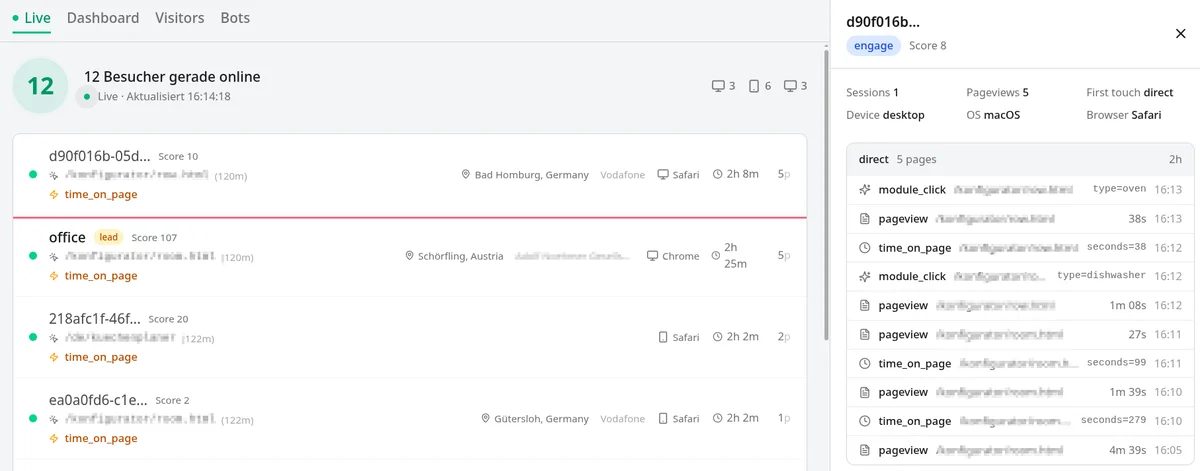
Every enquiry knows its origin.
Ad origin per enquiry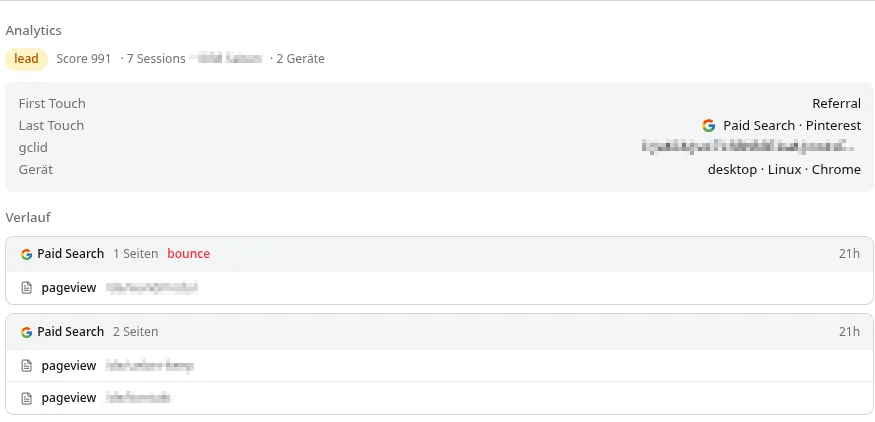
Bots out of your numbers.
Bot filter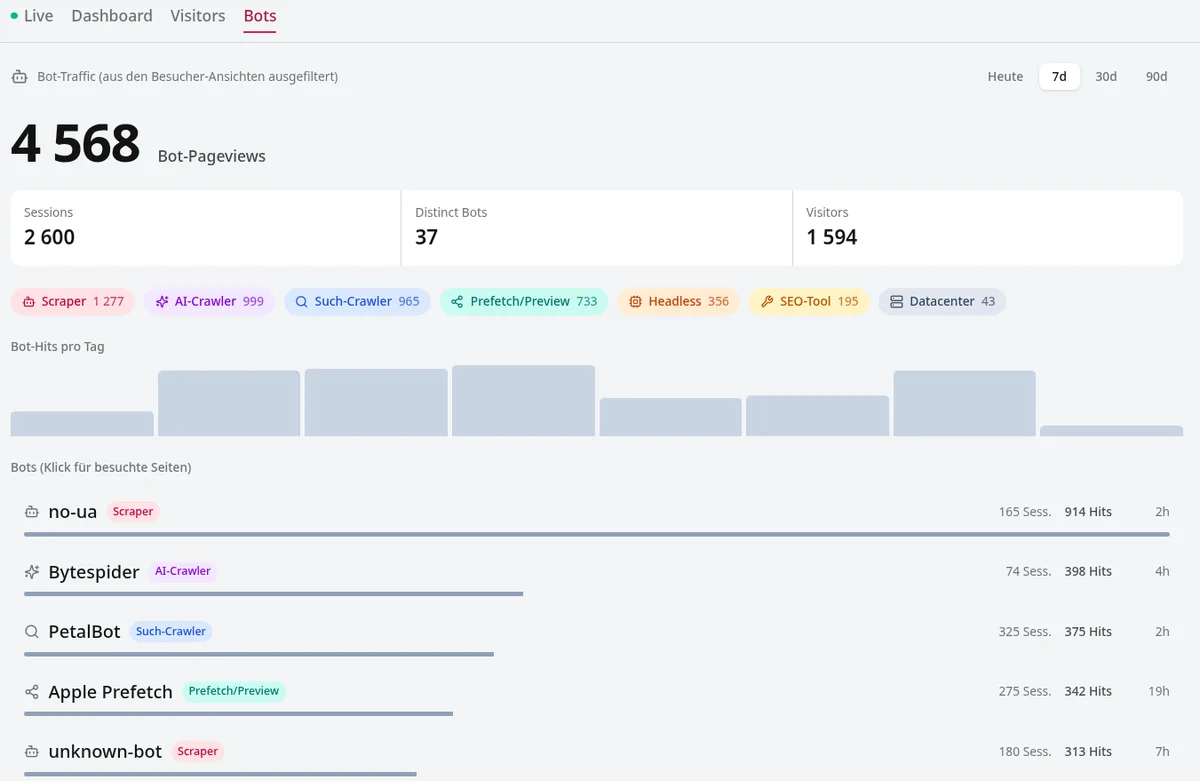
Images that label themselves.
Media library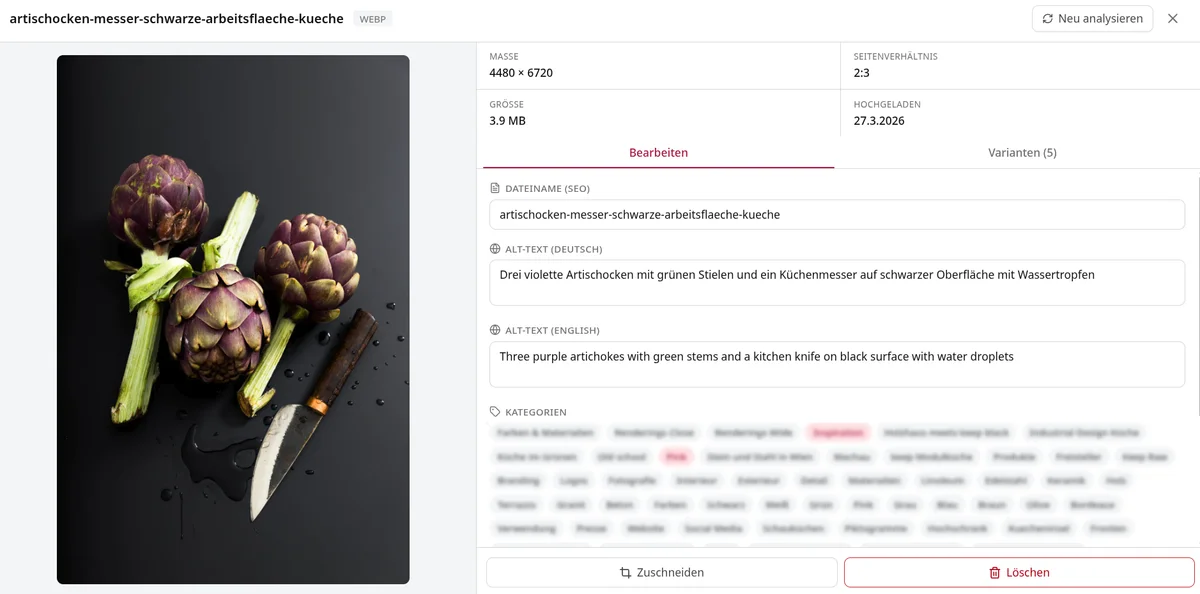
Around half of global web traffic comes from bots: scrapers, crawlers, click machines. Across our clients, 10,000 real visitors come with roughly 60,000 bot hits.
If nobody filters, your advertising is optimised for machines.
No site builder. Engineered code.
Because your website is built code and not a site builder, almost anything is possible: animations that guide the eye. Transitions that feel like quality. Interactive elements all the way to a 3D configurator. You describe the idea, the AI builds it.
And if it hurts load time, we say no. Beauty never beats the 1 second.
Motion with intent
Elements appear on scroll, numbers count up, charts draw themselves. Guidance for the eye, not fireworks.
Interaction that sells
Calculators, sliders, configurators. One client request became a full 3D configurator with prices from the ERP.
Craft you can feel
Micro-animations, soft transitions, clean typography. Your website feels like your standard.
No enquiry left behind.
A full CRM is built in: a deal board with freely configurable pipelines, every enquiry automatically becomes a deal card. The AI writes, a human decides. And it gets better with every decision.
An enquiry comes in
Form or email: the lead becomes a deal card in the CRM, with its ad origin frozen in: campaign, search term, channel. The confirmation goes out immediately. If an entry fails, the system retries, no lead is lost.
The AI analyses and drafts
It reads the enquiry and the previous correspondence and drafts the right follow-up email. In your tone, with your product knowledge.
A human hits send
No email leaves the house automatically. You send the draft, or you edit it and state the reason.
Reminders included: if a lead goes quiet, the system nudges at the right time.
Every client email in one place.
The full correspondence per enquiry lands in the CRM from your real company inbox, including the email you wrote from your phone on the road. And what the system sends comes from your real sender address, with your usual signature. No anonymous mailing service.
- ✓Gmail and Google Workspace connected via a wizard, with a self-test
- ✓Instant confirmations from your address, with a PDF attachment if you want
- ✓When a prospect replies, running follow-up sequences pause automatically
- ✓No Google Cloud infrastructure? Polling mode works too.
Most setups only measure the final conversion. The events on the way there, often half the picture, stay invisible.
You can only optimise what you can see: the path to the enquiry, not just the enquiry.
As little cookie banner as legally possible.
Consent management is part of the system, not a bought-in third-party banner. It only asks for what genuinely requires consent. A website without consent-requiring third-party services runs with no banner at all.
- ✓Decisions are logged verifiably without personal data, the visitor keeps a receipt number
- ✓Privacy texts are maintained bilingually in the product and versioned
- ✓The AI may draft legal texts. Publishing is structurally reserved for humans.
- ✓Built-in preview: what shorter data retention would cost you in ad attribution, calculated from your own numbers
Developed together with privacy lawyers. More on that further down this page.
In project industries, the most valuable enquiries come by phone. US analysts rate calls as several times stronger at closing than web leads.
And that is exactly where most measurement is at its worst.
Software someone is actually watching.
The Blueprint Machine is not a tool we throw over the fence. Your instance reports to us before you have to. And your feedback has a return channel.
Telemetry you may read
Every 15 minutes your instance sends us a technical status report: versions, module health, masked errors. Never leads, visitors or message contents. The full list is visible on your side, and can be switched off. A stuck mail sync catches our eye before you notice it.
Feedback with a return channel
You report straight from the product, screenshot included. We answer in the same thread, schedule it and mark it “fixed in version X”. The card on your board moves along automatically. If you move it elsewhere, it is never moved back.
Updates with a safety net
You apply updates yourself, one click, with readable patch notes. Afterwards the system tests itself, and rolls back on its own if something is off. 34 releases in the last 10 weeks.
Connections only from your instance outward · one key = exactly one instance · daily, integrity-checked backups
Once a growth hack is in a blog or on LinkedIn, it is called best practice and barely moves anything, because everyone does it. The head start exists only in the window before others copy.
Online marketing is an arms race. Whoever tests first, wins.
Test, do not guess.
Pretty web design does not sell. Measured improvement does. That is why A/B testing is built in: both variants are live, traffic is split, your own analytics decides.
- ✓Hypotheses come from the AI, with access to a comprehensive growth-hacking playbook from two decades of practice
- ✓The assistant builds the variants in minutes, reviewed by a senior
- ✓Measured first-party, no third-party testing tool
- ✓The winner becomes the new champion, the result is documented, the insight flows back into the playbook
Advertising works with a delay, shaped like a bell curve. How fast depends on price, promise and decision phase: cheap and urgent converts immediately, expensive and deferrable takes weeks and many visits.
Conversion happens when will, energy and motivation meet, and doubt is minimised.
Chat with your numbers.
The whole system speaks MCP (Model Context Protocol), the open standard AI assistants use to operate tools. What started as a prototype is now 73 tools. You can even connect your own AI agent.
- ✓73 tools: analytics, CRM, sales drafts, A/B tests, AI visibility
- ✓The limits are built in, not agreed on: an agent can never delete anything, can only read analytics, can only draft emails and never send
- ✓Separate read and write keys, each key valid for exactly one instance
- ✓The built-in assistant you write to every day uses the same access
Does ChatGPT recommend you yet?
More and more customers ask an AI instead of googling. The system measures how many real people reach you from AI answers, cleanly separated from AI crawlers, all the way down to the won deal. And it actively queries the engines with your brand prompts.
- ✓Its own “AI referral” channel in analytics, down to deal value
- ✓Visibility index, mention and citation rate, share of voice against competitors
- ✓llms.txt, structured data and AI bot rules come with the system
- ✓Paid engine queries are hard-capped, in euros
The first built block of our long-term goal. More in the roadmap below.
You see who means business.
Every lead gets a score from real behaviour: visit depth, dwell time, clicks, form interaction. The crucial part: for every lead you can read up on why it scores exactly that way. No black box.
- ✓Weights are adjustable, every change documented and reversible
- ✓The AI may suggest changes. Nothing is applied without your say-so.
- ✓The score sits on every deal card, right next to the ad origin
The more urgent or expensive a service, the more click fraud: emergency services, construction, medical procedures. A single click there quickly costs a two-digit amount.
Exactly where advertising is most expensive, fraud is most common.
Your tools can stay.
You have automations running or tools you do not want to give up, and you need them talking to each other? No problem. We connect them, directly through interfaces, without third parties like Zapier in between.
- ✓Directly via interface (API) or webhook, in both directions
- ✓No middleman: no extra subscription, no additional data processor, one less link that can break
- ✓Existing automations keep running, the foundation fits in
- ✓A senior reviews every connection for security and data flow
We bet on the best AI we can find.
The heart of the Blueprint Machine is Claude by Anthropic, in our assessment the best language model (LLM) available today. But we do not bind ourselves blindly: the system stays open, and the cost side is deliberately engineered.
The right model per task
Curated models instead of one-size-fits-all: cheap ones for image tagging, strong ones for writing. OpenAI and Perplexity are used where we measure your visibility in their AI answers.
Subscription + API, combined smartly
We combine subscription plans and API usage exactly as the providers' terms of service allow, and as cost-efficiently as possible. AI costs do not eat margin.
Knowledge that accumulates on its own.
An AI is only as good as what it knows about your business. With us, that does not take a project: the knowledge builds up in daily work, from every correction and every real customer reply.
Learns from every correction
Edit an AI draft and the change flows back, reason included. The system distils it into permanent writing rules, hourly, as soon as there is enough new material.
Sales knowledge stays in the house
What your best salesperson carries in their head ends up in the playbook. It stays, even when people leave. And it is the groundwork for everything you may want to automate later.
Coaching and workshops whenever you want them: so you and your team understand what happens behind the scenes and stay in control at every point.
- ✓No big-bang project: the knowledge grows in daily business
- ✓Open, readable format, no vendor lock-in: your knowledge belongs to you
- ✓You can always see what is in there, and what the AI makes of it
Built for what is coming.
More and more customers ask an AI instead of googling. With us, around 15 percent of enquiries already arrive through AI assistants. And so you know where you stand, this also lists what does not exist yet.
The foundation
Website, built-in CRM, first-party analytics, ad measurement, A/B testing, consent management, AI visibility (GEO), AI assistant with 73 tools. Running in daily use at paying clients, 34 releases in the last 10 weeks.
- ◷Selling directly on the website (checkout)
Every underlined item expands into a preview from the workshop. None of this is for sale today; if one of these is decisive for you, we will tell you in the intro call when it is realistic.
Clickless Internet Foundation
When customers ask instead of click, the business an AI can read, understand and recommend wins. That is why the foundation is machine-readable, addressable and measurable from day one. And with GEO we already measure how visible you are in AI answers.
One partner. One monthly price.
No licence jungle: software, operations and guidance from one hand, as a managed service from €2,200 per month. The exact scope depends on your business.
- ✓The Blueprint Machine: website, AI assistant on your channel of choice, CRM, analytics, media library, ad measurement
- ✓Operations and updates on your two dedicated servers (staging + live, Hetzner DE), including backups and security checks
- ✓A monthly coaching call with senior-level marketing professionals
- +Takeover of your existing website or a fresh build, depending on where you start
- +Custom modules: you say what is missing. It gets built and senior-reviewed
Compare that: a single additional employee costs around €50,000 a year. You get a small team that replaces an agency and stays on your project. And your existing team gets noticeably more done without anyone new starting. Only then come the tools: single-tool stacks cost €1,000 to €5,000 a month.
We only take on as many clients as we can know and look after personally. No customer numbers, no ticket systems. That is why everything starts with a conversation, not a buy button.
How you start. Without a megaproject.
Switching is not a rebuild: your existing website is taken over as a 1:1 copy, the design stays practically identical, and the migration is SEO-clean: redirects, URL structure, canonicals, schema data. You review every page before it goes live.
Intro call
30 minutes about your business, your advertising, your bottlenecks. We tell you straight whether we can help.
Your foundation is built
We build your system and migrate your existing content. Measurement, consent and CRM are in from day one.
We do not sell perfection. Is this for you?
AI makes mistakes, breaks things and hallucinates. We cannot change that today, and we will not pretend we can. With the right safety nets and a well-thought-out implementation, we consider it every bit as dependable as a human employee with real authority: controlled, correctable, within limits.
Even so, we recommend our product to no one where lives are at stake, satellites must not fall from the sky, or disasters could be set off.
- ✓You run an owner-led project business with an active ad budget.
- ✓Your marketing carries more than it can lift.
- ✓You want to stay in control without dealing with tech and GDPR.
- ✓Your deals take a long decision path. That is where attribution pays off.
- ✕You want to hand everything off completely. Then you need an agency.
- ✕You work without an ad budget and without project business.
- ✕An AI mistake would be intolerable in your world: emergency healthcare, air traffic control, emergency dispatch, medical decisions, nuclear power and critical infrastructure, military and security systems. That risk we deliberately do not take.
Not sure where your business stands? Tell it to us straight, and we will tell you straight.
Three things we also do on their own.
Not everyone needs the whole system. These services are available on their own, with the same experience behind them.
Sparring at eye level.
Consulting, sparring and guidance through change processes for business owners, heads of marketing and heads of sales. Including onboarding with your team, to proceed with empathy and understanding. No fluff: uncomfortable honesty, served with workable proposals. Whether second opinion, innovation pressure or restructuring. Experienced in working with legal counsel, boards and M&A.
Server-side tracking & attribution.
We audit your setup: conversion events, GDPR compliance, with a Google Tag Manager server container or true first-party server-side tracking. Browser-side pattern recognition and ad blockers are accounted for. Promising 100% coverage would be dishonest, but we are really close. Let us talk about building a data foundation that erases the guesswork about your target audience.
AI-built code, made production-ready.
You had AI build something and it almost works? Our core craft: code review, refactoring, testing, security and performance, until it is stable enough for real customers. Then tracking setup and launch marketing on top. We just clean up after it.
We work with privacy lawyers.
Every claim about data protection on this page has to survive a professional review. That is why we do not interpret the GDPR ourselves: our setups are built alongside privacy lawyers, documented, auditable, and able to withstand scrutiny.
Technology and law speak different languages. We speak both.
You are a privacy lawyer? Bring us on board.
Your clients get legal opinions from you and need someone who implements them technically, correctly and verifiably: consent architecture, server-side measurement, data flows, documentation for your audit. We are the technical counterpart who understands your points instead of arguing them away.
In 5 minutes we find money your website is leaving on the table.
Send us your website address. We look at it with experience going back to 2007 and send you three concrete findings within 48 hours: what your advertising loses, what slows you down, what is left lying around. Free, no appointment, no sales call.
And if we find nothing? We say that too. Then you have it in writing that your website is clean.
What you are probably asking yourself.
“An AI on my website? Sounds risky.”
Nothing goes live without being checked. By people. You check the content, we check security, stability, performance and whether everything works from a marketing, tracking and data-flow perspective. The reviewers are not mere programmers but marketing-tech engineers. The AI works exclusively in the test environment (staging).
“Am I making myself dependent?”
You are trading dependencies. That is true of every solution, including doing it yourself. The difference: data, server and tools sit in one place, on your dedicated servers. And should you leave one day: your website and your data are handed over. If you wish, you can buy out the Blueprint Machine at its current state of development for a one-off fee, without redistribution rights, without further updates, without support or warranty.
“Is ChatGPT or a site builder not enough?”
You can do that. The difference lies in what gets forgotten: measurement, consent, attribution, backups, server operations, security. Here it is built in from the start and continuously checked by people.
“How fast is something actually live?”
You say what you want in one sentence. The assistant puts it into the test environment (staging) within minutes, evenings and nights included. It goes live after your sign-off and the senior review, followed by a functional test. Our record: 5 minutes to staging, one hour to live. Active clients have 30 to 100 changes built per month.
“Is all of this ePrivacy and GDPR compliant?”
Yes. Without consent we only measure anonymously and cookieless, with no access to the device at all, exactly as the law expressly allows. Extended measurement and data sharing with Google or Meta only start after active consent. Individual processing operations for which the law provides its own legal basis, such as fraud prevention or measuring conversions within an existing customer relationship, rest on legitimate interest. Anonymous data is deleted automatically after 90 days, identifiers are only ever transmitted encrypted (hashed), every change is logged. The data sits on your own servers in Germany, and you can opt out at any time.
“What happens to my SEO during migration?”
The migration is done cleanly from an SEO perspective, guaranteed. For your search engine optimiser: URL structure, redirects (301), canonicals, schema data, DOM structure and content uniqueness are all handled properly and carried over. We will address every single one of their points. And if you do not have one: file the topic mentally under “it is being taken care of”.
“Who reviews your GDPR claims?”
Not us alone. Our setups are built together with privacy lawyers: documented, auditable, able to withstand scrutiny. Without consent we only measure anonymously and cookieless, every outbound switch is off by default, and the data sits on your own servers in Germany. If your DPO or lawyer has questions: we are happy to talk to them directly, at a professional level.
“Do you also take on projects without the Blueprint Machine?”
Yes, three things: consulting and sparring for owners, heads of marketing and sales. Server-side tracking and attribution as an audit and implementation in your existing infrastructure. And the Vibe Code Janitor: making AI-built code production-ready, with review, tests and hardening. Everything starts with the same free intro call.
“What does it cost?”
From €2,200 per month as a managed service. The base price covers the Blueprint Machine, operations with updates and the monthly coaching. Further services are part of the full scope, partly on request. We define the exact scope in the intro call.
“And if it does not work for us?”
We agree measurable goals, in writing. If they are not met, we keep working until they are.
Let us talk. 30 minutes that compound.
Tell us about your business. We will tell you straight whether and how we can help. And because onboarding here means full attention, we only take on one new client at a time.
“A phenomenon in marketing, performance and digital sales. You feel the passion in every conversation.”
Book the free intro call. If it fits on both sides, you are the next client we take on.
Not decided yet? Reserve your spot in line. When the time comes, you will not wait forever, you will already be up.